How to Export Shopify Products to CSV Instantly
Stop manual work. Grablist lets you bulk export Shopify products to CSV with full variant data in seconds.
✓ One-time payment (No $199/yr subscriptions) • Full access forever
⚠️ The Problem We Solve
- ❌Manual copy-pasting is slow
- ❌Standard export misses custom metafields
- ❌Data formatting errors in Excel
✨ Key Capabilities
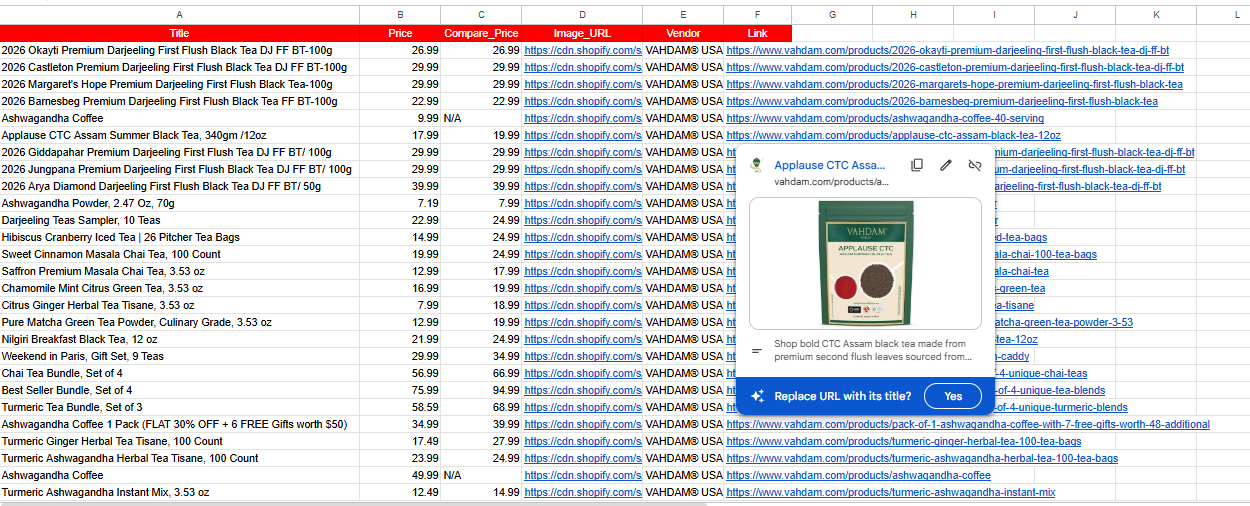
📊 Export Data Structure
| Product Title | SKU | Price | Inventory Level | Category |
|---|---|---|---|---|
| Example Data | Sample Row | ... | ... | ... |
| Another Entry | ... | $29.99 | ... | ... |
💡 Pro Tip:
Use our 'Auto-Format' feature to directly open the exported CSV in Excel without alignment errors.
📖 How to Use
Install GrabList
Add extension from Chrome Web Store
Open Any Shopify Store
Navigate to product page or collection
Click & Export
Choose format and download instantly
❓ Frequently Asked Questions
Is GrabList free to use?▼
Yes! GrabList offers a generous free tier. For power users, we offer a lifetime deal for just $49—no monthly or yearly subscriptions, unlike competitors who charge $199/year.
Will this work on password-protected Shopify stores?▼
We prioritize store privacy and security. GrabList does not scrape or extract data from password-protected stores. Our tool is designed to work only on publicly accessible store data that you can view normally.
Can I export metafields with the free version?▼
Metafield export is available in the Pro plan. Free version exports standard fields only.
Is my store data secure?▼
Yes! All processing happens locally in your browser. We never store your store data on our servers.
🔗 You Might Also Need
Need high-res images? Grablist bulk downloads Shopify product images with origin...
→ Scrape Shopify Product Data for Competitor AnalysisAnalyze market prices and inventory. Scrape any Shopify store data into CSV form...
→ Extract Shopify Product Variants to CSVManage complex variants easily. Export all Shopify product options and variants ...
📝 Page update history
- • May 26, 2026: Added support for Shopify Markets multi-currency
- • April 15, 2026: Updated CSV format compatibility with WooCommerce 8.7+
- • March 1, 2026: Added bulk export progress indicator